
How to File Your Annual Income Tax Return (ITR) Using BIR eBIRForms
Published Date: July 02, 2026
Published By: Jac Cantos, Upcloud Accounting
Every year, Filipino business owners, freelancers, and self-employed professionals face the same April deadline: the filing of the Annual Income Tax Return (ITR). For many, the process feels overwhelming, not because the math is complicated, but because navigating the BIR's systems, choosing the right form, and avoiding common errors requires knowledge that most taxpayers never formally receive.
The BIR eBIRForms System is the BIR's offline and online platform for preparing and filing tax returns electronically. Since Revenue Regulations No. 6-2014 mandated electronic filing for an expanding list of taxpayers, eBIRForms has become the primary filing tool for the majority of non-eFPS registered individuals and small businesses in the Philippines.
This guide walks you through the entire process, from downloading and installing eBIRForms, to selecting the correct ITR form, filling it out accurately, submitting it electronically, and paying any taxes due, step by step.
Who is Required to File an Annual ITR?
Under Section 51 of the National Internal Revenue Code (NIRC), as amended by RA 10963 (TRAIN Law), the following individuals are required to file an Annual ITR:
Self-employed individuals - sole proprietors, freelancers, and professionals earning income from the practice of their profession
Individuals with mixed income - those earning both compensation (employment) income and business or professional income
Corporations and partnerships - all domestic and resident foreign corporations registered with the BIR
Estates and trusts subject to income tax
Who is NOT required to file:
Under the TRAIN Law's substituted filing provision, a purely compensation income earner whose sole employer has withheld the correct amount of tax is not required to file an annual ITR, provided their employer files the BIR Form 2316 on their behalf. However, this exemption does NOT apply if:
The employee has two or more employers at any time during the taxable year
The employee's compensation exceeds Php 60,000 per month
The employee has income other than compensation
The employer did not withhold any tax
Reference: Section 51(A), NIRC as amended by RA 10963; RR No. 8-2018 (Substituted Filing)
Which ITR Form Should You Use?
Choosing the correct form before you begin is critical. Using the wrong form is a common reason for rejected filings.
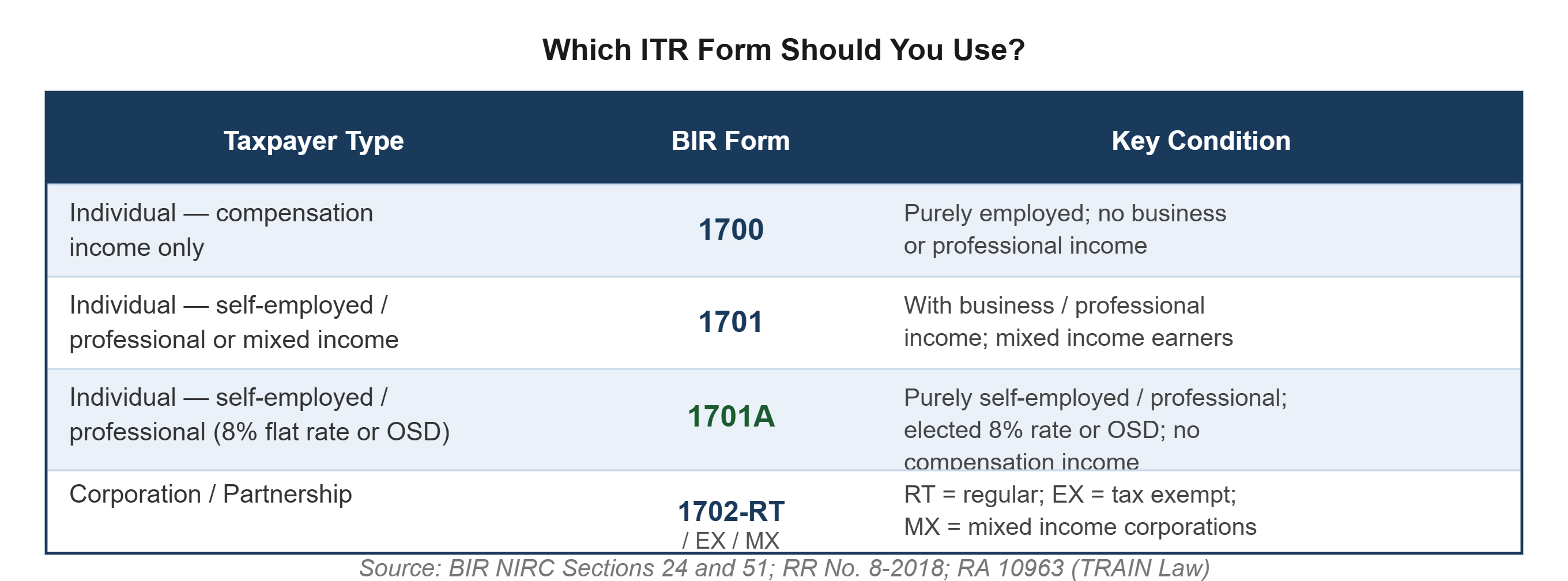
The 8% Income Tax Rate Option (BIR Form 1701A) Under the TRAIN Law, self-employed individuals and professionals with gross sales/receipts and other non-operating income not exceeding Php 3,000,000 may opt to be taxed at a flat 8% income tax rate on gross sales/receipts in excess of Php 250,000, in lieu of the graduated income tax rates and the 3% Percentage Tax. This election must be made on or before the first quarter ITR filing for the year and cannot be revoked mid-year.
Reference: Section 24(A)(2)(b), NIRC as amended by RA 10963 (TRAIN Law); RR No. 8-2018
Step 1: Download and Install eBIRForms
The eBIRForms Offline Package is a free, downloadable application from the BIR that allows taxpayers to fill out tax return forms offline and submit them electronically.
Go to the official BIR website. Navigate to https://www.bir.gov.ph and look for the eBIRForms section under the "eServices" menu.
Download the latest eBIRForms Offline Package. Always use the most current version of the offline package. The BIR periodically updates eBIRForms to incorporate new tax forms, formula changes, and system fixes. Filing using an outdated version may result in validation errors or incorrect computations.
As of the time of this writing, the current version is eBIRForms Offline Package v7.9.4. Check the BIR website to confirm the latest available version before downloading.
Install the application on your computer. Run the downloaded installer and follow the on-screen setup instructions. eBIRForms is compatible with Windows operating systems. Mac users will need to use a virtual Windows environment or file directly through the eBIRForms Online portal at https://ebirforms.bir.gov.ph.
Register your Taxpayer Identification Number (TIN) in the system. Upon first launch, eBIRForms will prompt you to enter your TIN and other taxpayer details. Ensure these match your BIR registration records exactly. Discrepancies in TIN, taxpayer name, or RDO code can cause filing errors.
Reference: BIR Revenue Regulations No. 6-2014 (Mandatory eBIRForms Filing); BIR Revenue Memorandum Circular No. 19-2015
Step 2: Open the Correct ITR Form
Launch eBIRForms and select your ITR form. From the eBIRForms main dashboard, select the appropriate ITR form from the dropdown list of available forms. Refer to the form selection table above to confirm you are using the correct form for your taxpayer classification.
Review the form before entering data. Take a few minutes to browse through the form's sections before filling anything in. Understanding the structure of the form, income schedules, deductions, tax credits, and computation summary, helps prevent data entry errors.
Prepare your supporting documents before you start. You should have the following on hand before completing the ITR form:
Books of accounts or financial statements for the taxable year
All quarterly ITR filings for the year (BIR Forms 1701Q or 1702Q)
BIR Form 2307 certificates received from clients or customers who withheld expanded withholding tax on payments to you
BIR Form 2316 (if you also have employment income)
Schedule of gross sales/receipts broken down by month or quarter
Schedule of deductible expenses (if using itemized deductions)
Prior-year ITR for reference (comparative figures)
Step 3: Fill Out the ITR Form - Section by Section
The following guide uses BIR Form 1701A (the most commonly used form for self-employed individuals and professionals under the TRAIN Law) as the primary reference. The same general principles apply to Forms 1700, 1701, and 1702.
Part I: Background Information
Enter your basic taxpayer information accurately:
TIN: must match your BIR Certificate of Registration (Form 2303) exactly
Taxpayer's Name: last name, first name, middle name as registered with the BIR
Registered Address: as appearing on your BIR Form 2303; use your RDO-registered address, not your current residential or business address if different
RDO Code: your Revenue District Office code as shown on your Form 2303
Line of Business / Occupation: enter the nature of your trade or profession
Taxable Year: confirm it is the calendar year being filed (January 1 to December 31)
⚠️ Common error: Entering your current address instead of your BIR-registered address. This causes a mismatch with BIR records and may result in a rejected filing.
Part II: Total Tax Payable
This section computes your final tax payable. It is populated based on information entered in the schedules below. Do not fill this in manually, allow the eBIRForms system to auto-compute based on your entries in the income and deduction schedules.
Schedule 1: Computation of Tax Due
For taxpayers using the 8% flat rate (Form 1701A):
Enter your:
Gross Sales or Receipts: total gross revenue from your trade or profession for the entire year
Other Non-Operating Income: interest income, rental income, and other income not from your primary business (do not include income subject to final tax)
Less: Php 250,000 exemption: the 8% rate applies to gross sales/receipts in excess of Php 250,000
Tax Due at 8%: computed automatically
For taxpayers using graduated rates (Forms 1701 / 1701A with OSD election):
Enter your:
Gross Sales or Receipts: total for the year
Less: Allowable Deductions: either the 40% Optional Standard Deduction (OSD) computed on gross sales, or your itemized deductions supported by BIR-registered invoices
Net Taxable Income: gross receipts minus allowable deductions
Tax Due: computed by the system based on the TRAIN Law graduated tax table:
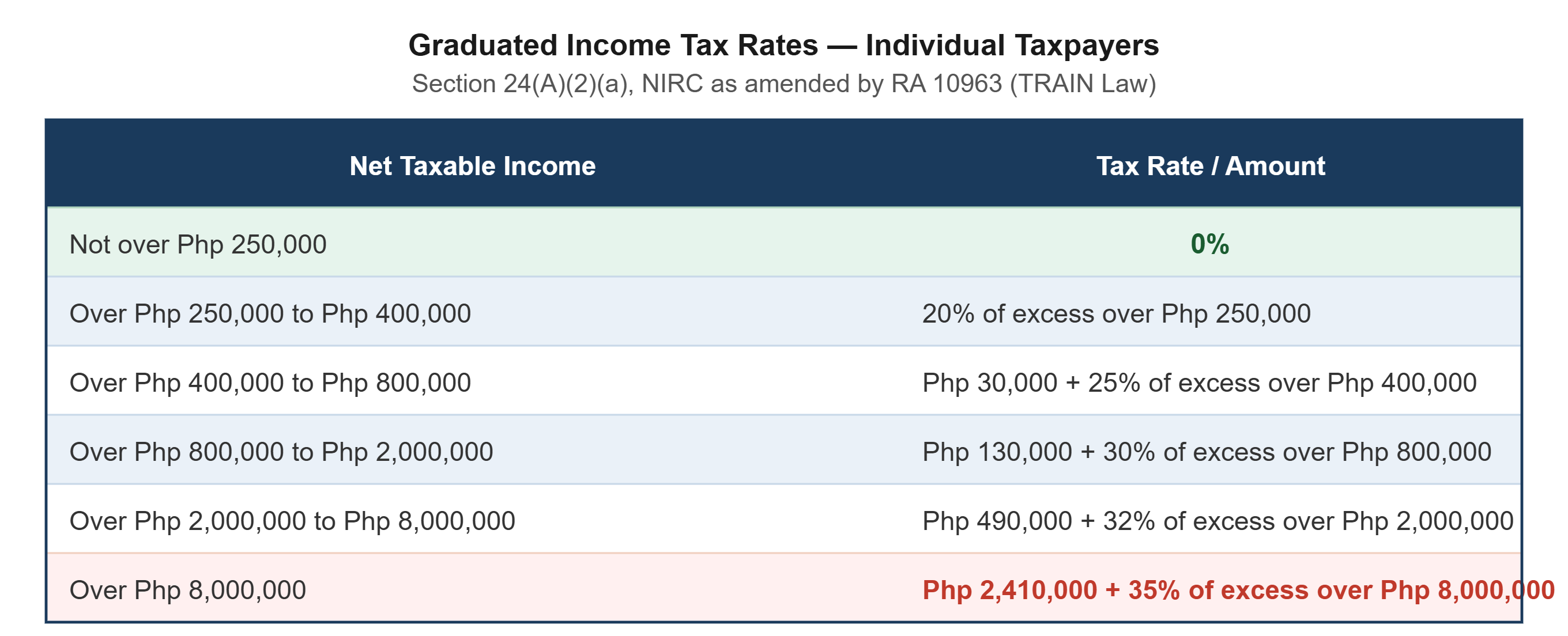
Reference: Section 24(A)(2)(a), NIRC as amended by RA 10963 (TRAIN Law)
Schedule 2: Tax Credits / Payments
This section is critical for avoiding overpayment or underpayment.
Enter the following credits against your computed tax due:
Creditable Withholding Taxes (from BIR Form 2307): total expanded withholding taxes withheld by your clients and covered by Form 2307 certificates
Prior year's excess tax credits: if your prior-year ITR showed an overpayment that you carried forward (not refunded), enter it here
Quarterly income tax payments already made: total of all four quarterly ITR payments made during the year (BIR Forms 1701Q / 1702Q)
⚠️ Critical check: The sum of quarterly income tax payments entered here must match the amounts declared in your four quarterly returns. Discrepancies between quarterly filings and the annual ITR are one of the most common audit triggers.
Part III: Tax Payable or Overpayment
After entering all income, deductions, and tax credits, the form will compute either:
Tax Still Due: the remaining balance owed to the BIR after credits; this must be paid on or before April 15
Overpayment: if your credits exceed your tax due, you have two options:
To be refunded: file a claim for refund (subject to BIR processing)
To be applied as tax credit for next year: carry forward the overpayment as a credit against your next year's income tax liability (the simpler and more common option)
Step 4: Validate and Save the Form
Click the "Validate" button in eBIRForms. Before submitting, run the built-in validation check. The system will flag missing required fields, format errors, and calculation inconsistencies. Address all validation errors before proceeding.
Review the Summary Page. After validation, eBIRForms generates a summary of all entries. Review this carefully against your source documents, particularly:
Total gross income
Total deductions (if itemized)
Total creditable withholding taxes
Total quarterly payments
Final tax due or overpayment
Save the completed form. Save the file in the eBIRForms native format (.xml) on your computer. This saved file is your working copy and is what will be submitted electronically.
Step 5: Submit the Return Electronically
Click the "Submit" or "Final Copy" button. When you are satisfied with the form and all validation checks pass, click the Submit or Final Copy button within eBIRForms. The system will transmit the return electronically to the BIR.
Retrieve your email confirmation. After successful submission, the BIR will send an email confirmation to the email address registered in your eBIRForms profile. This email contains your Filing Reference Number (FRN). Save this email and the FRN, it is your proof of electronic filing and will be required for payment and for producing your ITR stamp for loan applications, visa processing, and other purposes.
⚠️ If you do not receive an email confirmation within a few minutes, do not assume the filing went through. Check your spam folder. If no email arrives, log in to the eBIRForms Online portal (https://ebirforms.bir.gov.ph) to verify submission status and resubmit if necessary.
Step 6: Pay the Tax Due (If Any)
If your ITR shows a Tax Still Due, you must pay it on or before April 15 of the following year (or the applicable extended deadline). Payment can be made through the following BIR-accredited channels:
BIR-Accredited Payment Channels
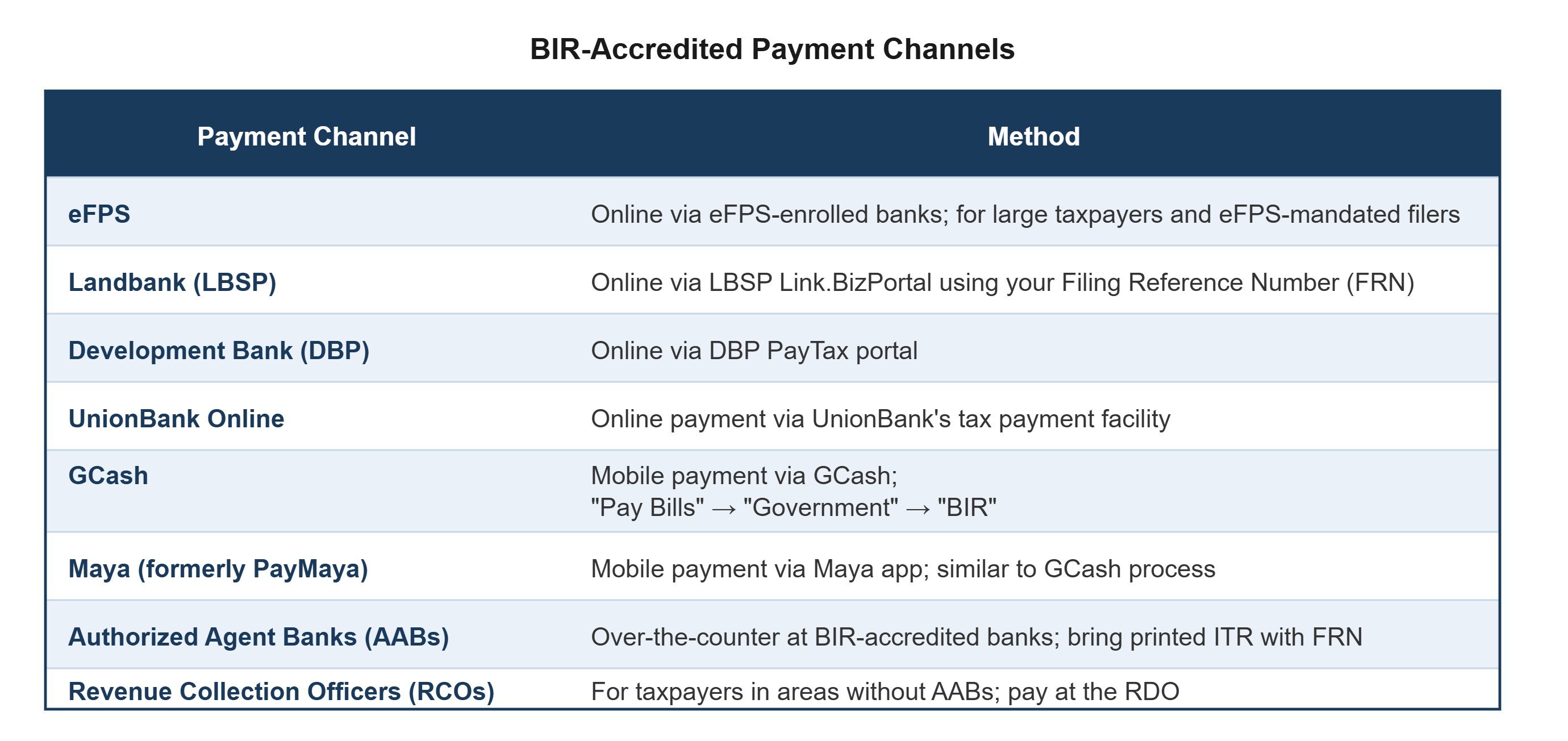
⚠️ Important: Payment does not automatically complete your filing. Filing (via eBIRForms) and payment are two separate steps. Your ITR is considered filed upon receipt of the FRN from eBIRForms. Payment must be completed separately using the FRN as the reference.
Reference: BIR RMC No. 117-2022 (Expanded Digital Payment Channels); BIR RMC No. 49-2021
Step 7: Stamp and Retain Your ITR
Print three copies of your filed ITR. Print the ITR form and the email confirmation / FRN. Under BIR regulations, you should retain:
One copy for your personal records
One copy for your accountant or tax preparer
One copy to be stamped by the BIR (for ITRs requiring a stamped received copy)
Have your ITR stamped at your RDO (if required). Under BIR RMC No. 19-2015, taxpayers who file via eBIRForms and pay through AABs are entitled to a BIR-stamped received copy. Bring your printed ITR (three copies) and the official payment receipt to your RDO or the AAB where you paid. The bank or RDO will stamp and retain one copy and return the others to you.
Note: For ITRs filed and paid entirely through online channels (GCash, Maya, eFPS), the email confirmation and payment confirmation together serve as proof of filing and payment in lieu of a physical stamp. Retain both documents.
Retain all supporting documents for ten years. Your annual ITR and all supporting documents, financial statements, Form 2307 certificates, quarterly ITRs, receipts, invoices, and books of accounts, must be retained for ten (10) years from the filing date under Section 235 of the NIRC. Do not dispose of these records.
Common Mistakes That Lead to Penalties
1. Using the wrong ITR form. Filing BIR Form 1701A when you should be using Form 1701 (because you have both business and compensation income) is a substantive error that the BIR can treat as a false or fraudulent return, independent of whether the tax amount is correct.
2. Entering quarterly payments that do not match filed quarterly returns. If the quarterly income tax payments you entered on the annual ITR do not match the amounts on your filed quarterly returns, the BIR system will flag this as a discrepancy. Always reconcile quarterly filings before completing the annual return.
3. Forgetting to include all BIR Form 2307 credits. Each Form 2307 received from a client represents withheld tax that belongs to you, it is a credit against your liability. Missing even one certificate means you are overpaying. Collect all Form 2307s from clients before filing.
4. Filing late. The annual ITR deadline is April 15. Under Section 248 of the NIRC, late filing carries a 25% surcharge on the tax due, plus 12% annual interest (computed from the due date to the payment date), plus a compromise penalty based on the amount of tax due. There is no grace period.
5. Paying without filing, or filing without paying. Both are violations. A return filed without corresponding payment is treated as an unfiled return for penalty computation purposes. Payment without a filed return does not constitute compliance.
6. Not updating your eBIRForms to the latest version. Outdated versions of eBIRForms may contain formula errors or outdated tax tables. Always verify you are using the current version before preparing your return.
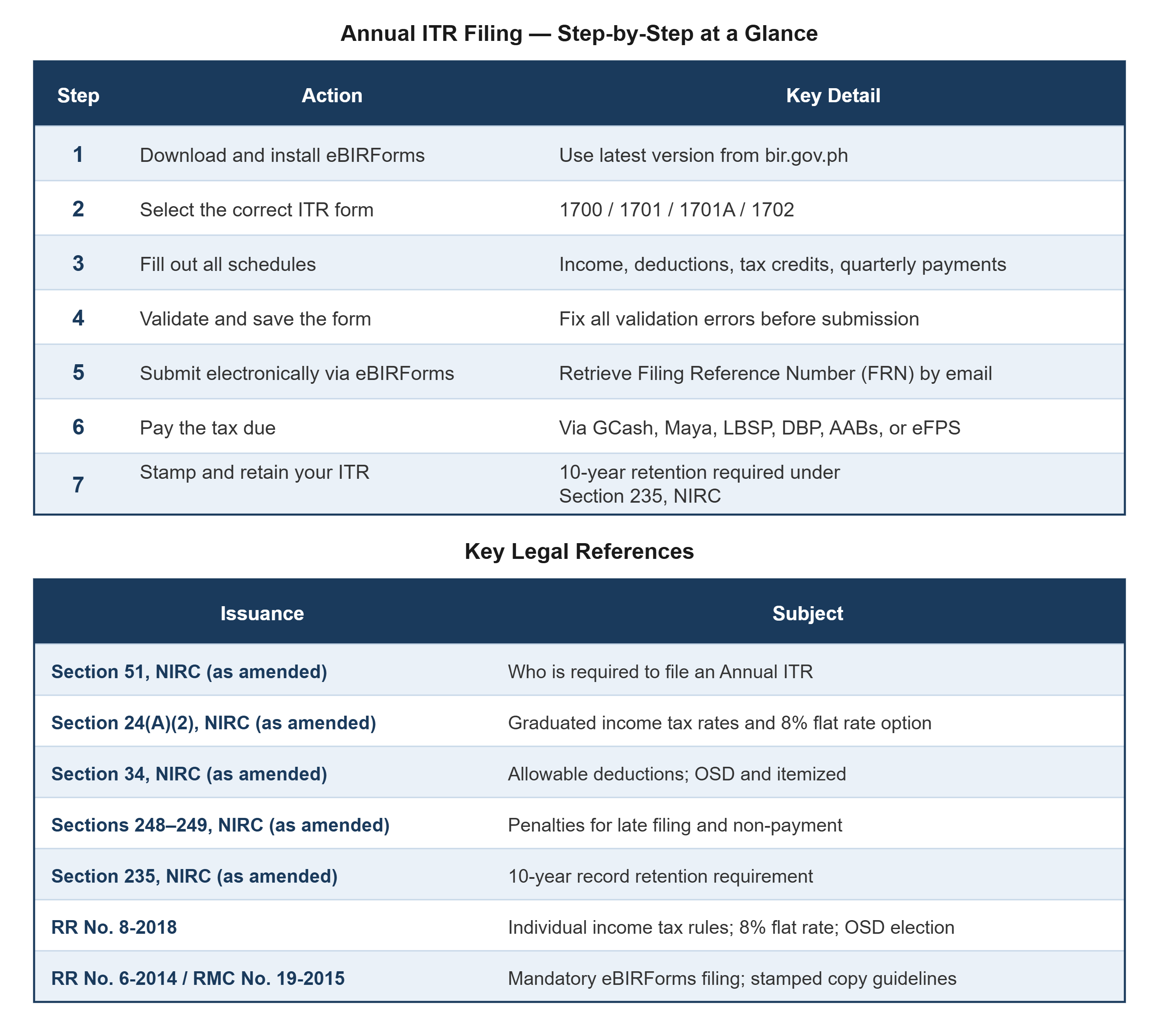
Summary: Annual ITR Filing - Step-by-Step at a Glance
Conclusion
Filing your Annual Income Tax Return through BIR eBIRForms is a process that rewards preparation. The taxpayers who file cleanly every year are those who keep accurate books throughout the year, collect their Form 2307 certificates diligently, reconcile their quarterly returns before April, and start the ITR preparation process well before the deadline, not on April 14.
If you are unsure about which form to use, whether the 8% flat rate or the graduated rates are more advantageous for your income level, or how to properly report your deductions, a licensed accountant can prepare and file your ITR accurately and identify opportunities to minimize your tax liability within the bounds of the law.
References
Bureau of Internal Revenue. National Internal Revenue Code (NIRC), Sections 24, 34, 51, 235, 248–249, as amended by RA 10963 (TRAIN Law). https://www.bir.gov.ph
Republic of the Philippines. Republic Act No. 10963 — Tax Reform for Acceleration and Inclusion (TRAIN Law). Congress of the Philippines, 2017.
Bureau of Internal Revenue. Revenue Regulations No. 8-2018: Implementing Rules on Individual Income Tax; 8% Flat Rate Option and OSD. BIR, 2018.
Bureau of Internal Revenue. Revenue Regulations No. 6-2014: Mandatory Use of eBIRForms for Non-eFPS Taxpayers. BIR, 2014. https://www.bir.gov.ph
Bureau of Internal Revenue. Revenue Memorandum Circular No. 19-2015: Procedures for Filing via eBIRForms. BIR, 2015.
Bureau of Internal Revenue. Revenue Memorandum Circular No. 49-2021 and RMC No. 117-2022: Expanded BIR Digital Payment Channels. BIR, 2021–2022.
Bureau of Internal Revenue. BIR eBIRForms Offline Package (latest version). https://www.bir.gov.ph/eservices
Upcloud Accounting: Virtual Outsourced Accounting and Bookkeeping Services in the Philippines
Upcloud Accounting offers accounting, bookkeeping, tax compliance, and business licensing services specializing with startups and SMEs in the Philippines.
Our goal is to increase efficiency, automation, and transparency across the accounting and finance functions of our clients with our cutting-edge technology. If you want to move your company’s finance function online, contact our Team of Expert Accountants and Bookkeepers directly via [email protected] or visit www.upcloudaccounting.comto learn more about how Upcloud Accounting accounting services can support your PH business!
Disclaimer: This article or blog is only for general knowledge and guidance and is not a substitute for an expert opinion. For technical advice, please consult your tax / legal advisor for your specific business concerns. For comments, suggestions, and feedback, feel free to email us at [email protected].